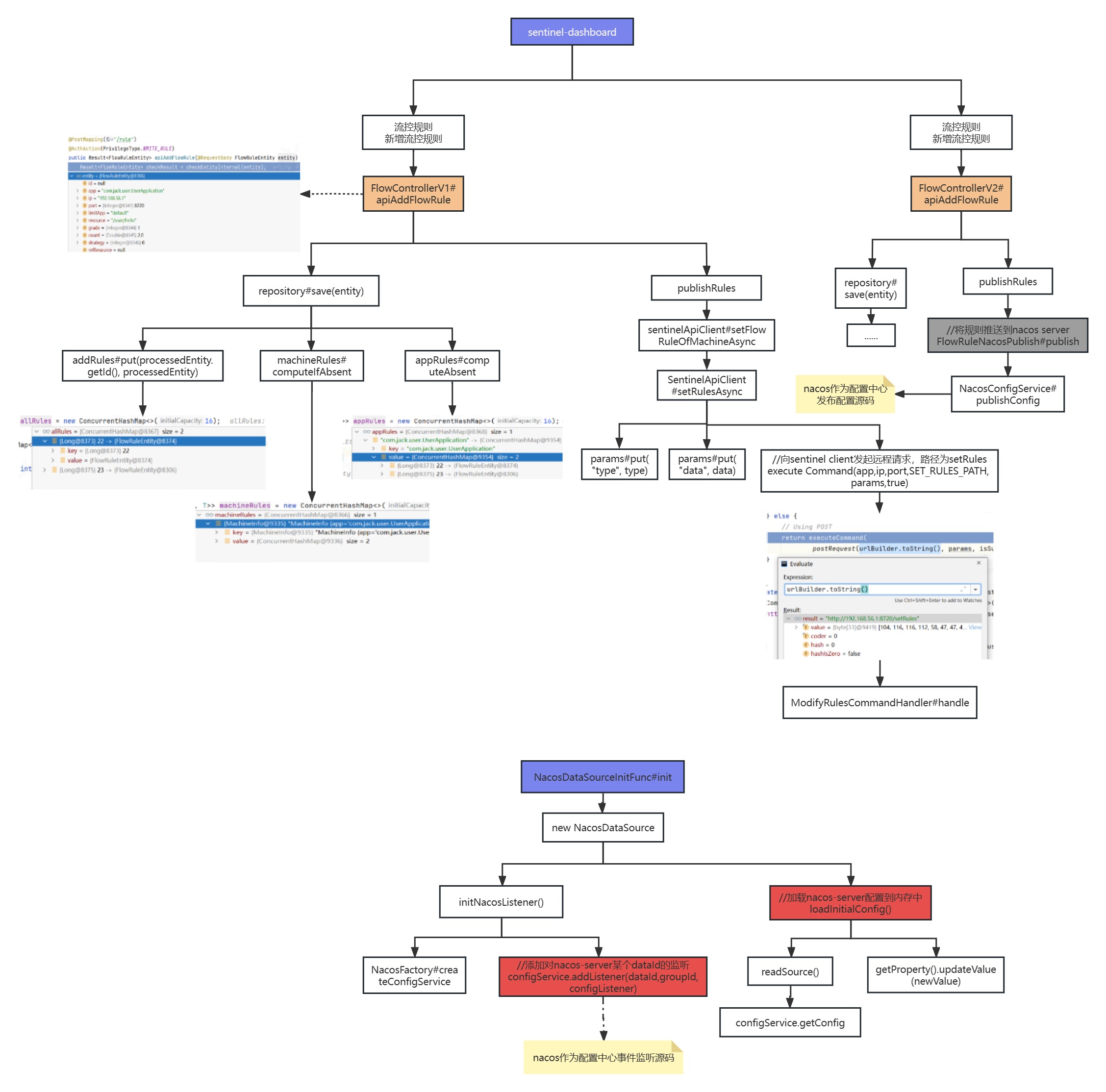
官网:https://github.com/alibaba/Sentinel/wiki/动态规则扩展
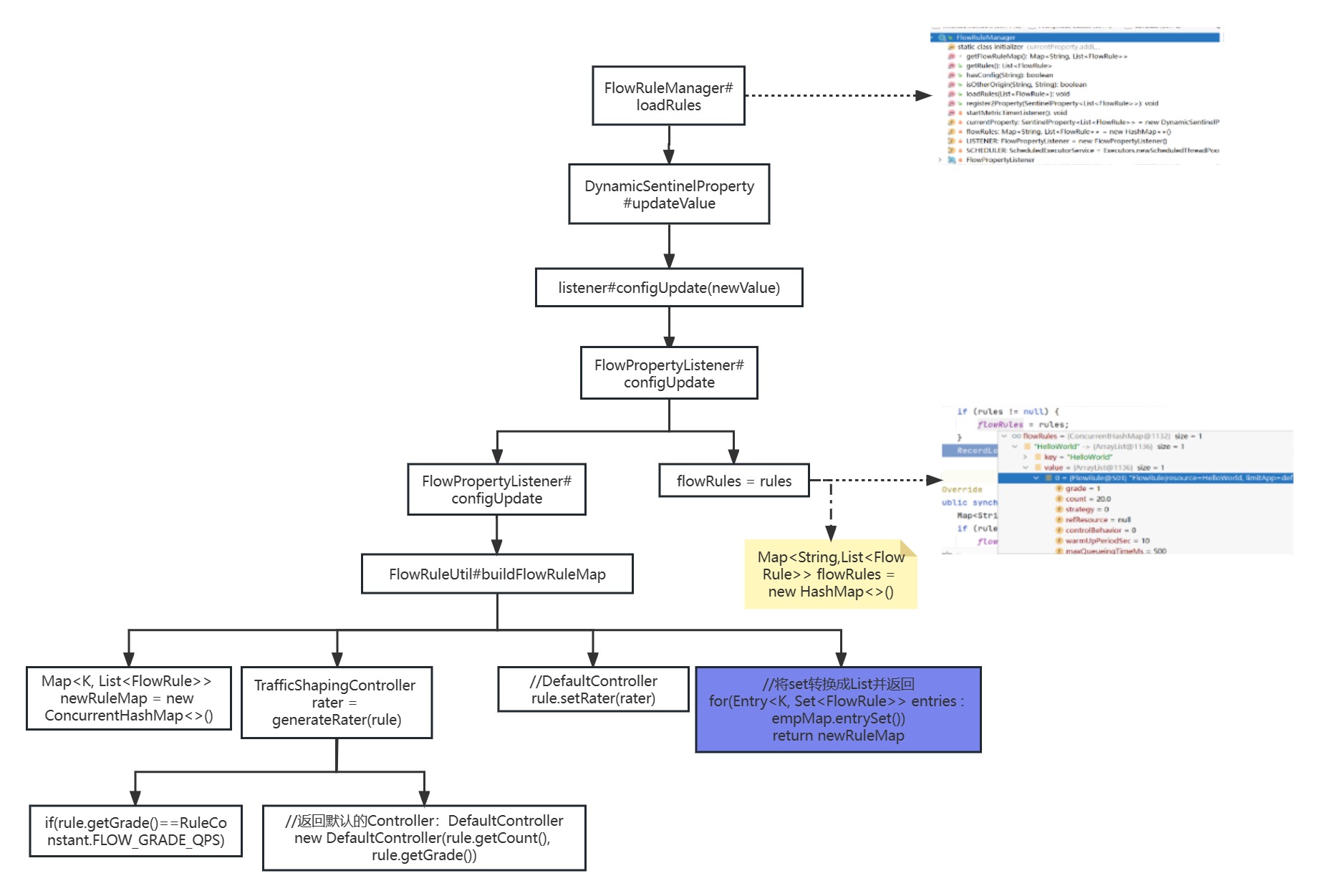
1 客户端内存的规则
1.1 规则的存储
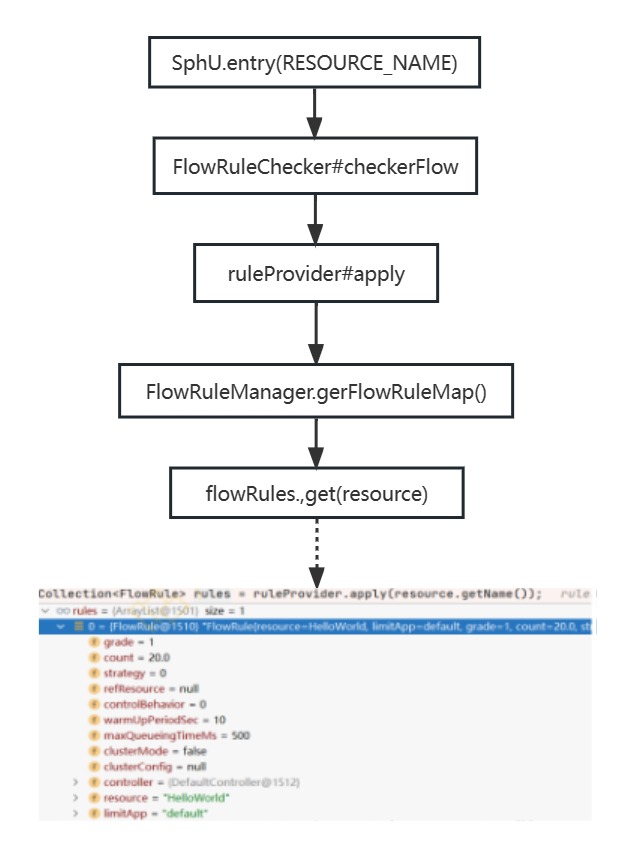
1.2 规则的获取
2 Dashboard规则管理
2.1 三种模式
| 推送模式 |
说明 |
优点 |
缺点 |
| 原始模式 |
API将规则推送至客户端并直接更新到内存中,扩展写数据源(WritableDateSource) |
简单,无任何依赖 |
不保证一致性;规则保存在内存中,重启即消失,严重不建议用于生产环境 |
| Pull模式 |
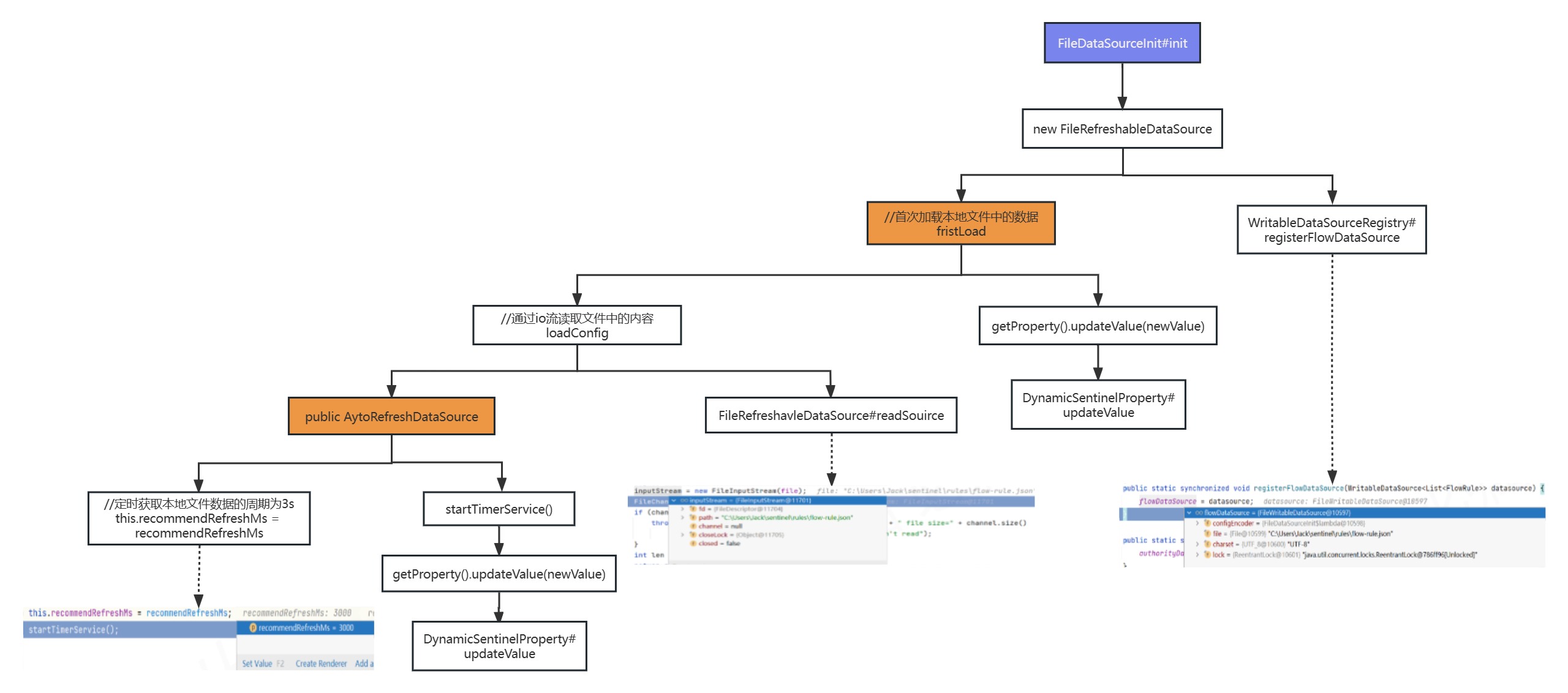
扩展写数据源(WritableDataSource),客户端主动向某个规则管理中心定期轮询拉取规则,这个规则中心可以是RDBMS、文件等 |
简单,无任何依赖;规则持久化 |
不保证一致性;实时性不保证,拉取过于频繁也可能会有性能问题 |
| Push模式 |
扩展读数据源(ReadableDataSource),规则中心统一推送,客户端通过注册监听的方式时刻监听变化,比如使用Nacos、Zookeeper等配置中心。这种方式有更好的实时性和一致性保证。生产环境下一般采用push模式的数据源 |
规则持久化;一致性;快速 |
引入第三方依赖 |
2.2 原始模式

1
2
3
4
| dashboard调用客户端的常见api:
http://localhost:8720/api -> ApiCommandHandler
http://localhost:8720/getRules?type=flow -> FetchActiveRuleCommandHandler
http://localhost:8720/setRules?type=flow -> ModifyRulesCommandHandler
|
2.3 Pull模式

2.3.1 代码实现
(1)创建FileDataSourceInit实现InitFunc接口,用于本地规则的读取与写入
1
2
3
4
5
6
| public class FileDataSourceInit implements InitFunc {
@Override
public void init() throws Exception {
System.out.printLn("Pull模式,FileDataSourceInit...");
}
}
|
(2)根据Sentinel中提供的SPI机制,在指定目录下创建文件及配置
1
2
3
4
5
|
resources/META-INF/services/com.alibaba.csp.sentinel.init.InitFunc
com.test.user.initFuc.FileDataSourceInit
|
(3)debug测试FileDataSourceInit#init方法是否调用
(4)在C:\Users\Jack\sentinel\rules目录创建几种规则的json文件,用于在本地存储对应的规则
1
2
3
4
5
| 流控规则:flow-rule.json
降级规则:degrade-rule.json
热点参数规则:param-flow-rule.json
授权规则:authority-rule.json
系统规则:system-rule.json
|
(5)编辑FileDataSourceInit类,定义这些规则文件对应的变量
1
2
3
4
5
6
7
8
9
10
11
12
13
14
15
16
17
18
19
20
21
22
23
24
25
26
27
28
29
30
31
32
33
34
35
36
| public class FileDataSourceInit implements InitFunc {
@Override
public void init() throws Exception {
System.out.printLn("Pull模式,FileDataSourceInit...");
String rulePath = System.getProperty("user.home") + "\\sentinel\\rules";
String flowRulePath = rulePath + "\\flow-rule.json";
String degradeRulePath = rulePath + "\\degrade-rule.json";
String paramFlowRulePath = rulePath + "\\param-flow-rule.json";
String authorityRulePath = rulePath + "\\authority-rule.json";
String systemRulePath = rulePath + "\\system-rulle.json";
System.out.printLn("流控规则的文件全路径为: "+flowRulePath);
this.mkdirIfNotExits(rulePath);
this.createFileIfNotExits(flowRulePath);
this.createFileIfNotExits(degradeRulePath);
this.createFileIfNotExits(paramFlowRulePath);
this.createFileIfNotExits(authorityRulePath);
this.createFileIfNotExits(systemRulePath);
}
private void mkdirIfNotExits(String filePath) throws IOException {
File file = new File(filePath);
if(!file.exists()){
file.mkdirs();
}
}
private void createFileIfNotExits(String filePath) throws IOException {
File file = new File(filePath);
if(!file.exists()){
file.createNewFile();
}
}
}
|
(6)完善流控规则的读写数据源
1
2
3
4
5
6
7
8
9
10
11
12
13
14
15
16
17
18
19
20
21
22
23
24
25
26
27
28
29
30
31
32
33
34
35
36
37
38
39
40
41
42
43
44
45
46
47
48
49
50
| public class FileDataSourceInit implements InitFunc {
@Override
public void init() throws Exception {
System.out.printLn("Pull模式,FileDataSourceInit...");
String rulePath = System.getProperty("user.home") + "\\sentinel\\rules";
String flowRulePath = rulePath + "\\flow-rule.json";
String degradeRulePath = rulePath + "\\degrade-rule.json";
String paramFlowRulePath = rulePath + "\\param-flow-rule.json";
String authorityRulePath = rulePath + "\\authority-rule.json";
String systemRulePath = rulePath + "\\system-rulle.json";
System.out.printLn("流控规则的文件全路径为: "+flowRulePath);
this.mkdirIfNotExits(rulePath);
this.createFileIfNotExits(flowRulePath);
this.createFileIfNotExits(degradeRulePath);
this.createFileIfNotExits(paramFlowRulePath);
this.createFileIfNotExits(authorityRulePath);
this.createFileIfNotExits(systemRulePath);
ReadableDataSource<String, List<FlowRule>> ds =
new FileRefreshableDataSource<>(flowRulePath, source -> JSON.parseObject(source,
new TypeReference<List<FlowRule>>(){}));
FlowRuleManager.register2Property(ds.getProperty());
WritableDataSource<List<FlowRule>> wds = new FileWritableDataSoure<>(flowRulePath, this::encodeJson);
WritableDataSourceRegistry.registerFlowDataSource(wds);
}
private void mkdirIfNotExits(String filePath) throws IOException {
File file = new File(filePath);
if(!file.exists()){
file.mkdirs();
}
}
private void createFileIfNotExits(String filePath) throws IOException {
File file = new File(filePath);
if(!file.exists()){
file.createNewFile();
}
}
private <T> String encodeJson(T t) {
return JSON.toJSONString(t);
}
}
|
(7)测试Pull模式的流控规则是否生效,重启Spring Boot项目,访问 http://localhost:8081/user/hello,刷新dashboard,给/user/hello添加流控规则,看看本地文件flowrule.json中是否有数据。然后重启user服务,再次访问访问http://localhost:8081/user/hello,检查规 则是否还存在。
(8)通过dashboard修改流控规则,看看本地流控规则文件的数据变化。 修改本地流控规则文件,看看dashboard数据的变化。
(9)最后分别完善其他规则的代码
2.3.2 源码分析
2.4 Push模式
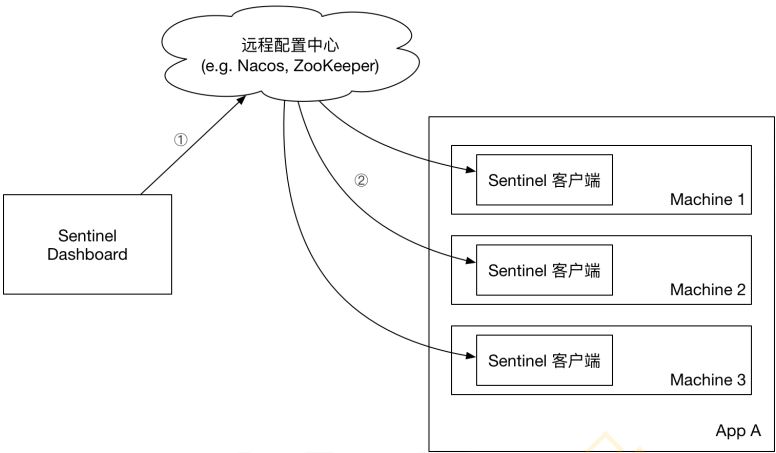
2.4.1 代码实现
2.4.1.1 sentinel-dashboard
(1)打开sentinel-dashboard pom文件,将sentinel-datasource-nacos依赖的scope[test]去掉
(2)将sentinel-dashboard项目中的test/rule目录下的nacos文件夹复制到src的rule目录下
(3)将src/nacos/NacosConfig中的nacos连接Bean地址更改成nacos-server所在地址
1
2
3
4
| @Bean
public ConfigSerevice nacosConfigService() throws Exception {
return ConfigFactory.createCOnfigService("localhost:8848");
}
|
(4)打开src/v2文件夹,找到FlowControllerV2中如下的两个属性,将其更改成nacos的实现类
1
2
3
4
5
6
| @Autowired
@Qualifier("flowRuleDefaultProvider")
private DynamicRuleProvider<List<FlowRuleEntity>> ruleProvider;
@Autowired
@Qualifier("flowRuleDefaultPublisher")
private DynamicRulePublisher<List<FlowRuleEntity>> rulePublisher;
|
(5)找到dashboard的前端显示页面,修改一个流控规则菜单作为测试
1
2
| //文件位置
webapp/resources/app/scripts/directices/sidebar/sidebar.html
|
(6)找到流控规则V1的注释内容,将其修改为nacos
1
2
3
4
5
6
|
<li ui-sref-active="active" ng-if="entry.appType==0">
<a ui-sref="dashboard.flow({app: entry.app})">
<i class="glyhicon glyhicon-filter"></i> 流控规则
</a>
</li>
|
(7)启动nacos-server,重启sentinel dashboard并访问
(8)访问http://localhost:8081/user/hello ,并在sentinel dashboard中添加流控规则nacos
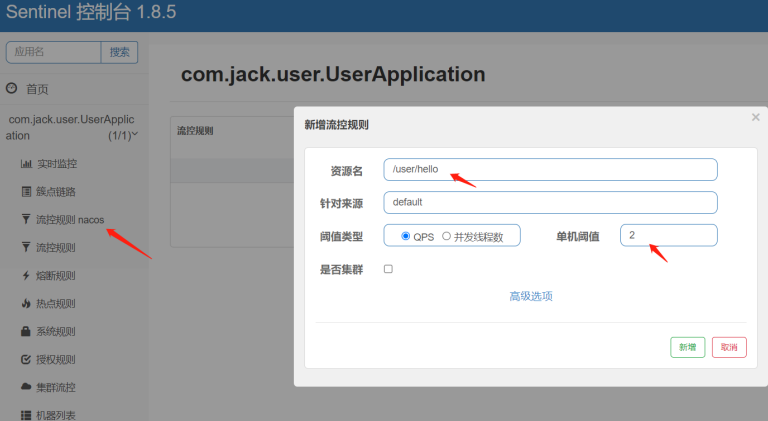
(9)查看nacos-server的配置管理,可以看到对应的流控规则
(10)分别在sentinel dashboard和nacos server进行修改配置,看是否能够保证数据一致性
2.4.1.2 user
(1)引入依赖
1
2
3
4
5
| <dependency>
<groupId>com.alibaba.csp</groupId>
<artifactId>sentinel-datasource-nacos</artifactId>
<version>1.8.5</version>
</dependency>
|
(2)注册数据源
1
2
3
4
5
6
7
8
9
10
| public class NacosDataSourceInitFunc implements InitFunc {
@Override
public void init() throws Exception {
final String remoteAddress = "localhost";
final String groupId = "SENTINEL_GROUP";
final String dataId = "com.jack.user.UserApplication-flow-rules";
ReadableDataSource<String, List<FlowRule>> flowRuleDataSource = new NacosDataSource<>(remoteAddress, groupId, dataId, source -> JSON.parseObject(source, new TypeReference<List<FlowRule>>() {}));
FlowRuleManager.register2Property(flowRuleDataSource.getProperty());
}
}
|
(3)添加SPI配置
1
2
| com.test.user.initfuc.FileDataSourceFunc
com.test.user.initfuc.NacosDataSourceInitFunc
|
(1)引入依赖
1
2
3
4
5
| <dependency>
<groupId>com.alibaba.csp</groupId>
<artifactId>sentinel-datasource-nacos</artifactId>
<version>1.8.5</version>
</dependency>
|
(2)写配置:bootstrap.yaml
1
2
3
4
5
6
7
8
9
10
11
12
13
| spring:
cloud:
sentinel:
datasource:
ds1:
nacos:
server-addr: ${spring.cloud.nacos.config.server-addr}
dataId: com.test.user.UserApplication-flow-rules
groupId: SENTINEL_GROUP
data-type: json
rule-type: flow
|
(3)注释掉之前的本地持久化和手动nacos配置
1
2
| #com.test.user.initfuc.FileDataSourceInit
#com.test.user.initfuc.NacosDataSourceInitFunc
|
(4)重启user服务,并进行相应的测试
2.4.2 源码分析