面向分布式、多语言异构化服务架构的流量治理组件
https://sentinelguard.io/zh-cn/
1 常见的容错方案
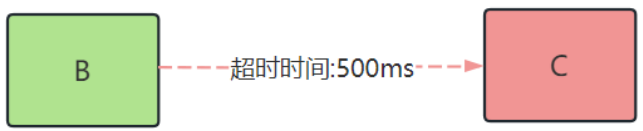
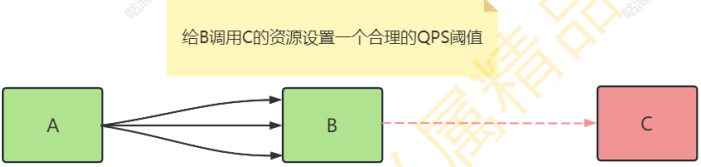
就以B调用C服务为例,怎样避免B服务因为C服务的不可用而导致自己不可用
- 超时
限流
舱壁模式

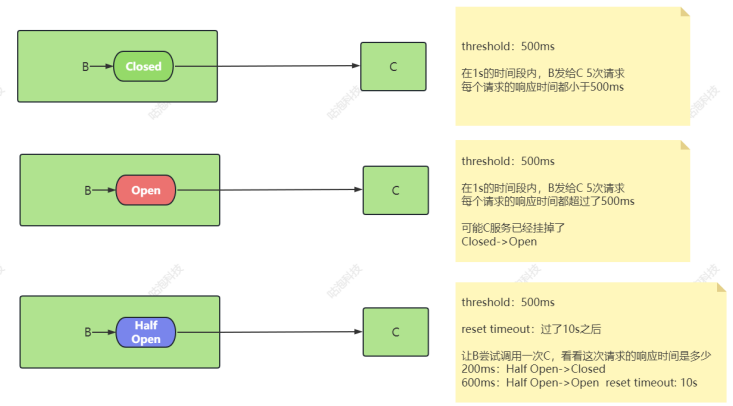
断路器
https://martinfowler.com/bliki/CircuitBreaker.html
2 快速入门
https://sentinelguard.io/zh-cn/docs/quick-start.html
2.1 原生API
1.引入依赖
1
2
3
4
5
| <dependency>
<groupId>com.alibaba.csp</groupId>
<artifactId>sentinel-core</artifactId>
<version>1.8.5</version>
</dependency>
|
2.定义资源
资源是 Sentinel 的关键概念。它可以是 Java 应用程序中的任何内容,例如,由应用程序提供的服务,或由应用程序调用的其它应用提供的服务,甚至可以是一段代码。在接下来的文档中,都会用资源来描述代码块。 只要通过 Sentinel API 定义的代码,就是资源,能够被 Sentinel 保护起来。大部分情况下,可以使用 方法签名,URL,甚至服务名称作为资源名来标示资源。
1
2
3
4
5
6
7
8
9
10
11
12
13
14
15
16
17
18
19
20
21
22
| public class SentinelExample{
private static final String RESOURCE_NAME = "Test";
public static void main(String[] args) {
initFlowRules();
while(true) {
Entry entry = null;
try {
entry = SphU.entry(RESOURCE_NAME);
System.out.printLn("hello sentinel");
} catch (BlockException ex){
System.out.printLn("blocked!");
} finally {
if(entry != null){
entry.exit();
}
}
}
}
}
|
3.定义规则
https://sentinelguard.io/zh-cn/docs/introduction.html
围绕资源的实时状态设定的规则,可以包括流量控制规则、熔断降级规则以及系统保护规则。所有规则可以动态实时调整。
1
2
3
4
5
6
7
8
9
10
| private static void initFlowRules(){
List<FlowRule> rules = new ArrayList<>();
FlowRule rule = new FlowRule();
rule.setResource(RESOURCE_NAME);
rule.setGrade(RuleConstant.FLOW_GRADE_QPS);
rule.setCount(20);
rules.add(rule);
FlowRuleManager.loadRules(rules);
}
|
4.运行方法,观察控制台
5.理解过程
1
2
3
| initFlowRules()
->FlowRuleManager.loadRules(rules)
->private static volatile Map<String, List<FlowRule>> flowRules = new HashMap<>();
|
可以理解为名称为HelloWorld的资源,目前拥有一个流控规则FlowRule,流控规则中有具体的一些值

1
2
3
4
| SphU.entry(RESOURCE_NAME)
->FlowSlot#entry
->checkFlow(resourceWrapper, context, node, count, prioritized)
->Collection<FlowRule> rules = ruleProvider.apply(resource.getName())
|
也就是在SphU#entry方法中,会根据资源名称拿到对应的流控规则FlowRule

1
2
3
| canPassCheck
->passLocalCheck
->canPass
|
最后在canPass方法中,会判断当前的QPS根据流控规则的配置是否能够通过

6.总结
1
2
| a.加载规则到内存 FlowRuleManager#loadRules(rules)
b.定义被保护的资源 SphU#entry
|
2.2 原生API-Web MVC
(1)定义FlowRuleController及被保护的资源
1
2
3
4
5
6
7
8
9
10
11
12
13
14
15
16
17
18
19
20
21
| @RestController
@RequestMapping("/flow")
public class FlowRuleController {
@RequestMapping("/hello")
public String hello() {
Entry entry = null;
try {
entry = SphU.entry("flow");
System.out.println("web mvc hello sentinel.");
return "web mvc hello sentinel.";
} catch (BlockException ex) {
System.out.println("web mvc flow limit!");
return "web mvc flow limit!";
} finally {
if (entry != null) {
entry.exit();
}
}
}
}
|
(2)加载规则到内存
1
2
3
4
5
6
7
8
9
10
| @PostConstruct
private static void flowRules() {
List<FlowRule> rules = new ArrayList<>();
FlowRule rule = new FlowRule();
rule.setResource("flow");
rule.setGrade(RuleConstant.FLOW_GRADE_QPS);
rule.setCount(2);
rules.add(rule);
FlowRuleManager.loadRules(rules);
}
|
(3)启动Spring Boot项目,并调用/flow/hello接口
2.3 @SentinelResource注解
(1)在FlowController中新增一个api接口,并且定义@SentinelResource注解,为value属性指定值, 其实这个属性值就是资源名称
1
2
3
4
5
6
| @RequestMapping("/test")
@SentinelResource(value="flow")
public String test() {
System.out.println("@Sentinel hello sentinel.");
return "@Sentinel hello sentinel.";
}
|
(2)引入依赖
1
2
3
4
5
| <dependency>
<groupId>com.alibaba.csp</groupId>
<artifactId>sentinel-annotation-aspectj</artifactId>
<version>1.8.5</version>
</dependency>
|
(3)定义配置类,实例化SentinelResourceAspect对象
1
2
3
4
5
6
7
| @Configuration
public class SentinelConfiguration {
@Bean
public SentinelResourceAspect sentinelResourceAspect(){
return new SentinelResourceAspect();
}
}
|
(4)重启Spring Boot项目,测试test接口的QPS是否生效
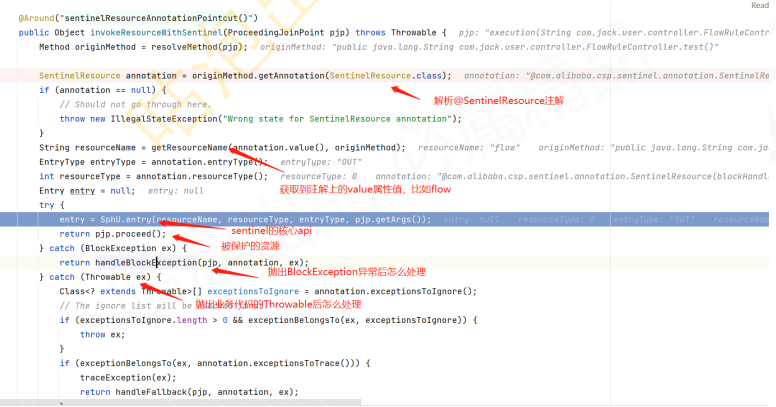
(5)简单分析一下实现原理
其实就是通过AOP给目标代码的前后添加上了SphU#entry相关的逻辑
(6)定义流控异常
1
2
3
4
5
6
7
8
9
10
11
| @RequestMapping("/test")
@SentinelResource(value="flow",blockHandler = "handleBlock")
public String test() {
System.out.println("@Sentinel hello sentinel.");
return "@Sentinel hello sentinel.";
}
public String handleBlock(BlockException e){
System.out.println("流控异常: "+e);
return "QPS超过阈值,流控了.";
}
|
2.4 客户端整合Sentinel控制台
https://sentinelguard.io/zh-cn/docs/dashboard.html
(1)下载控制台
https://github.com/alibaba/Sentinel/releases
(2)启动控制台
1
| java -Dserver.port=8080 -Dcsp.sentinel.dashboard.server=localhost:8080 -Dproject.name=sentinel-dashboard -jar sentinel-dashboard-1.8.5.jar
|
(3)访问控制台:http://localhost:8080
(4)客户端引入与sentinel dashboard通信的jar包
1
2
3
4
5
| <dependency>
<groupId>com.alibaba.csp</groupId>
<artifactId>sentinel-transport-simple-http</artifactId>
<version>1.8.5</version>
</dependency>
|
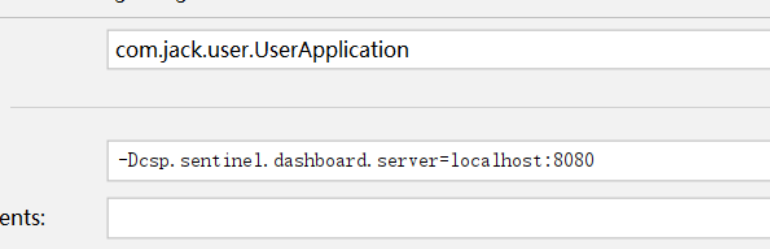
(5)配置启动参数
1
| Dcsp.sentinel.dashboard.server=localhost:8080
|
3 整合Spring Cloud Alibaba Sentinel
可以注释掉sentinel-core、sentinel-annotation-aspectj、sentinel-transport-simple-http,因为 在sentinel starter中都包含了
(1)引入依赖
1
2
3
4
| <dependency>
<groupId>com.alibaba.cloud</groupId>
<artifactId>spring-cloud-starter-alibaba-sentinel</artifactId>
</dependency>
|
(2)写配置
1
2
3
4
5
| spring:
cloud:
sentinel:
transport:
dashboard: localhost:8080
|
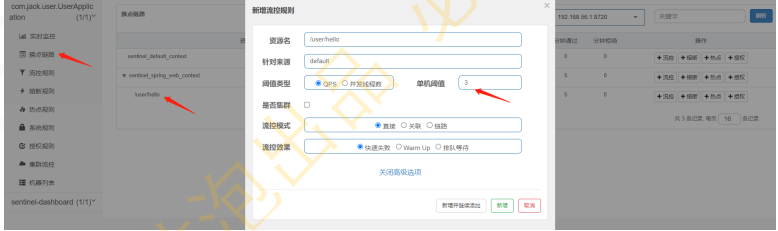
(3)重启user服务,访问:http://localhost:8081/user/hello
(4)打开sentinel dashboard,配置流控规则
(5)原理
1
2
3
4
5
6
7
8
| a-SphU#entry核心代码在哪
SentinelWebInterceptor#preHandle
...
Entry entry = SphU.entry(resourceName, ResourceTypeConstants.COMMON_WEB, EntryType.IN)
b-规则什么时候保存到客户端的内存中的?
a-dashboard点击保存按钮
b-微服务收到dashboard推送过来的规则
c-微服务将规则保存到内存中
|
(6)如何自定义流控之后的异常处理
1
2
3
4
| SentinelWebInterceptor#preHandle
->catch(Exception e)
->handleBlockException
->DefaultBlockExceptionHandler#handle
|
(7)可以替换掉DefaultBlockExceptionHandler
1
2
3
4
5
6
7
8
9
10
11
12
13
14
15
16
17
18
| @Component
public class JackWebMvcBlockExceptionHandler implements BlockExceptionHandler {
@Override
public void handle(HttpServletRequest request, HttpServletResponse response, BlockException e) throws Exception {
response.setStatus(429);
PrintWriter out = response.getWriter();
if(e instanceof FlowException){
out.print("Jack flow limit.");
out.flush();
out.close();
}else if(e instanceof DegradeException){
out.print("Jack degrade.");
out.flush();
out.close();
}
}
}
|
4 Sentinel客户端与服务端通信原理
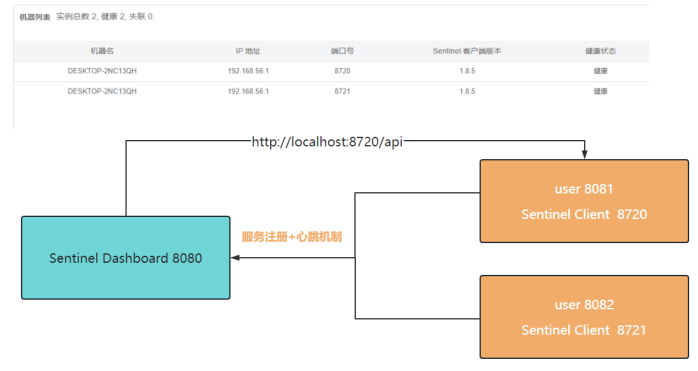
(1)服务注册+心跳机制:心跳时间间隔默认为10s,可以通过heartbeat-interval-ms进行修改
1
| SimpleHttpHeartbeatSender#sendHeartbeat
|
(2)访问:http://localhost:8720/api,就可以看到sentinel客户端提供了哪些api
(3)获取内存中的流控规则:http://localhost:8720/getRules?type=flow
1
2
| FetchActiveRuleCommandHandler#handle
-> "flow"
|
(4)设置内存中的流控规则
1
| ModifyRulesCommandHandler#handle
|